Pages

Showing posts with label literacy. Show all posts

Thursday, 12 April 2018

Great Literacy Resources

Great Literacy Resources


When the Division One teachers did the RSST training with Lana earlier this year she shared The Florida Center for Reading Research site. It is full of amazing, high-quality literacy resources. There's great phonemic awareness, phonics, vocabulary, and comprehension activities and resources on it for grades K-5 (I'm assuming it largely aligns with the Common Core, so I'm sure grade six will find these really useful, too). 


Check it out for some great Guided Reading and other activities! 


Sunday, 15 May 2016

Get Epic!

Hey everyone! Below is the link for that Get Epic! website I emailed you all about a couple weeks ago. If you haven't had a chance to check it out yet, the website is filled with e-books. They have so many different categories and genres, and many of the books have the option to be read aloud. Some of the books even list the A.R level! The website is absolutely free for educators, which is pretty great. I myself, have been using it a tonne since I discovered it. I often will play one of the read aloud stories to them during snack time. My kids look forward to this everyday. I encourage you all to check out the app as well. Both the website and the app are really quite easy to use. There is even an educator's dashboard where you can add and manage student profiles and view their reading progress. Oh! And there's also teacher resources available as well. Take a look at it - hopefully you and your students will enjoy it as much as me and my students do.

https://www.getepic.com


Wednesday, 9 March 2016

Marking in the paperless classroom

I don't know about anyone else, but a majority of the work in my classroom takes place in an online environment. It is possible to do marking through Google Classroom, but it isn't always the most effective system. Enter Goobric and Doctopus. The best way to explain it is to walk through an example of what exactly these programs do. I have used it for the past few assignments I have done with students, and it has really streamlined the process! 


Step One: Assign students a writing (or any other) assignment through Google Classroom. Name it something practical and descriptive so it is easy to find! 


Step Two: Type up your rubric in Google Sheets


When you do this, it is important that you put your numbers along the top (and leave A1) blank, and put your criteria down the left-hand side. 

Step Three: Open up a new (Blank) Google Sheets document. 
I usually name it whatever the project name is and then add assessment at the end. This is where all your marks will be compiled 


Step Four: In your newly created document, you will need to run the add-on Doctopus.
  • If you don't have it already, you can go to the add-ons tab, and go to get add-ons, and search for Doctopus. 
  • If you have the add-on, you will need to launch it.


Step Five: Use Doctopus to ingest your assignment and select rubric
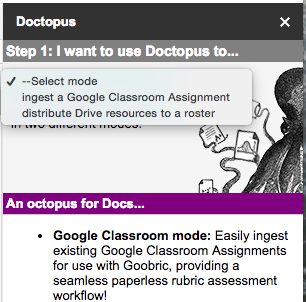

Step 1: Select "Ingest a Google Classroom Assignment"

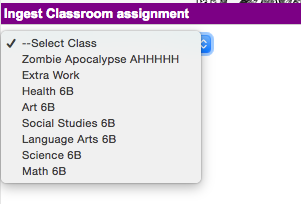
Step Two: Select your class from classroom


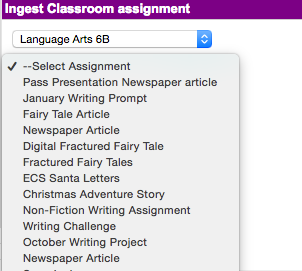
Step Three: Choose your Assignment  


Once you have your class and assignment chosen, you will pick your rubric
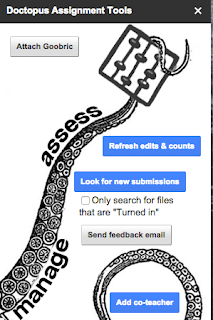
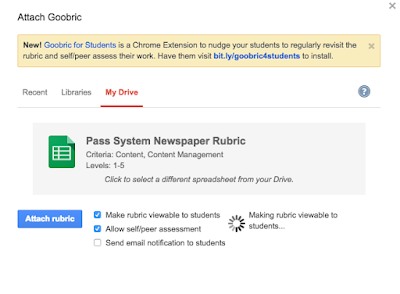
Click on "Attach Goobric"
Select your rubric from Google Drive. Must be in Sheets! 

Step Six: Make sure you have the Goobric Extension (You only need to do this step the first time you do this)

Go to the Google Chrome Web Store, and search for Goobric. Or you can just click on this link to go Goobric Extension. The icon looks like this, and will appear with your other extensions


Step Seven: Find your students' assignments in your Google Classroom folder within Google Drive 


Click on the first assignment to open it up. Once you have it open, you must click on your Goobric extension. It will open up the same student document in a new tab

Step Eight: Assess student writing/work and give feedback

When your students work opens up through Goobric, it will look like the image below. You simply click on the rubric description that fits their work to select it.  You can add comments into the comment box, and you can also attach a voice comment using the microphone button. When you are done, you can click submit. It will automatically move you onto the next assignment. 


Step Nine: Check out your assessment data 
If you go back to that new document you created all the way back in step three, all of your students' rubric scores and comments will be compiled there for you to view and print. The rubric scores and comments automatically attach themselves to the end of the students' assignment. 


Wednesday, 24 February 2016

The Trial of A. Wolf

This awesome lesson was created by Debbie Tchir-Houle, and it was too fun and amazing not to share with everyone! A huge shout-out goes to Deb for all of the hard work she put into setting up this activity, it was so comprehensive and well thought out!!


So here is the activity:
Using the book "The true Story of the 3 Little Pigs" by Jon Sciezska, students are witness in the trial of A.Wolf. They are asked to evaluate the evidence presented to arrive at either a guilty or innocent verdict for A. Wolf, who is accused of killing and eating 2 little pigs and attempting to kill the third. There are several exhibits from both the defence and prosecution that support either an innocent or guilty verdict. Students are shown all the evidence, and then left to arrive at a verdict based on what they seen and heard during the trial. 

I made a digital collection of the evidence (which is embedded below), but Deb has a physical collection as well that goes along with it! 


Here are some pictures of the evidence


When the students were finished, they had to go to their science blogs and explain their verdict, as well as their justification of why they decided he was either innocent or guilty. It was a nice tie between our evidence and investigation unit and language arts, where we just finished writing a news article about the Big Bad Wolf escaping from jail. Plus, it was a pretty fun science lesson!! 

Here are a few of our Blog posts:


Tuesday, 16 February 2016

Concept maps for Vocabulary

I'm in a really interesting course right now on connecting science and literacy in the classroom and I came across a useful good idea I thought I would share. By having students create a concept map in a small group to introduce a unit in science, you are able to engage them in meaningful discussion about the vocabulary they will be using during the unit of study. 

To do this activity, you simply print out a list of the vocabulary words that the students will be using during the unit and give each group a sheet. In small groups, you challenge them to arrange and glue the words on a blank sheet of paper based on the connections between them. They also need to write their own definition of the words as a group and use lines to connect words that are related in some way. Any words they are unsure about they use sticky tack to place on the side to connect in later. 

We did this activity today to introduce our evidence and investigation unit, and I couldn't believe how rich the dialogue was! Students were actually discussing the vocabulary and trying to work together to figure out what the words meant and how they could be connected together. For me, whose class is full of non-talkers, this was a big breakthrough! 

Here they are, working away! 


Friday, 29 January 2016

Technology and Literacy

These are some of the great resource ideas that were pooled together and talked about
during our Friday PD session!
Check out the links below

1) Scholastic Story Generator  - A generator that comes up with a prompt for some creative story writing. Teachers have the option of letting students type out a story in the program and also drawing a picture to go with it.

2) Trueflix - A site that lists categories in Science and Social studies each having many books per category. The books open up for fullscreen reading and the book can be read aloud to the students depending on whether they tag "Read on" or "off". 

3) Bookflix - Our third scholastic site that also has tons of books for students to read. Each book on the site can either be watched as a video, read aloud to them by a narrator, or simply read as is.
There are also resources listed at the top right of each book that include lesson plans and key words for ESL/ESD learners.

4) Black and Gold Div II - Math, LA, FLA, Science and Social studies from 4-6 are listed here, with a ton of resources to take from specific to Alberta Curriculum. It has tons of good projects and activities for the classroom as well as achievement indicators for each.

5) Readings A-Z - A website with another ton of books categories in 30 levels from aa to Z2. Each book is printable and project able. They also come with lessons with extensions for comprehension, phonemes, grammar and classroom discussion ideas.

6) Voice Note II - Available in the Chrome store free, this app allows students to record Speech to Text in a separate window.

7) Speakit - Another app but this one is the reverse, Text to Speech for those students that struggle to read independently or who may want to select a given word that he/she cannot pronounce. Once installed through your students google account, a small speaker will appear on the right side of the URL bar. They may select text and press the speaker button to have it read to them.

Thank you Tech group!


Wednesday, 28 October 2015

Reading Strategies

I'm sharing a strategy that I'm using with one of my struggling readers. I hope some of you will find it useful!

One of my students LOVES reading but she also LOVES to guess the words, which she is really great at. I was finding that she was "reading" the words while making direct eye contact with me. I was constantly reminding her to cover the word and sound out the letters one at a time. She really didn't like me telling her to sound it out, and often got frustrated.

So, today I told her we'd be playing a reading "game". I gave her five stickers and told her that every time she guessed a word, I would steal a sticker. I wouldn't take a sticker if she attempted to sound out a word and got it wrong. However, if the word is "tree" and she says "ball", then I would remind her to look at the first letter for a clue and then take a sticker. She really loved the idea and she was REALLY motivated to sound out the word instead of guessing.

You could differentiate this by giving students more or less stickers, depending on their reading level or how easily they get frustrated. If they're not into stickers, something small like gum or iPad minutes could also work!